ReverseProxy for IIS 6.0 in CS using ASP.NET: Difference between revisions
| Line 10: | Line 10: | ||
IIS [http://www.saltypickle.com/Home/16 ReverseProxy] in particular [http://www.saltypickle.com/Home/frontend16ThereforeProxy(v1.5).zip v1.5]. |
IIS [http://www.saltypickle.com/Home/16 ReverseProxy] in particular [http://www.saltypickle.com/Home/frontend16ThereforeProxy(v1.5).zip v1.5]. |
||
frontendredirectionsIprehanowikiase of software redirections of the backend server are not forwarded transparently to the frontend. Therfore we patched the C-Sharpe code to take care of that. We disabled the internal handling of redirections and transpose them instead to the frontend. |
frontendredirectionsIprehanowikiase of software redirections of the backend server are not forwarded transparently to the frontend. Therfore we patched the C-Sharpe code to take care of that. We disabled the internal handling of redirections and transpose them instead to the frontend. |
||
<pre>< |
<pre><nowiki>38c38 |
||
< const int MaximumRedirections = 50; |
|||
--- |
|||
> const int MaximumRedirections = 0; |
|||
357a358,370 |
|||
> switch((int) backEndResponse.StatusCode) { |
|||
> case 301: |
|||
> case 302: |
|||
> case 303: |
|||
> case 307: |
|||
> frontEndResponse.StatusCode = (int) back EndResponse.StatusCode; |
|||
> string newLocation = backEndResponse.Hea ders["Location"]; |
|||
> newLocation = Regex.Replace(newLocation, backEndSite, |
|||
> frontEndRequest.Url.GetLeftPart( UriPartial.Authority) + frontEndRequest.ApplicationPath, |
|||
> RegexOptions.IgnoreCase); |
|||
> frontEndResponse.RedirectLocation = newL ocation; |
|||
> break; |
|||
> }</nowiki></pre> |
|||
Then redirections which usally occur if you enterXP.g. <code><nowiki>http://foo/dir -> http://foo/dir/</nowiki></code> are forwarded to the browser as <code><nowiki>http://sar.informatik.hu-berlin.de/test -> http://sar.informatik.hu-berlin.de/test/</nowiki></code> |
Then redirections which usally occur if you enterXP.g. <code><nowiki>http://foo/dir -> http://foo/dir/</nowiki></code> are forwarded to the browser as <code><nowiki>http://sar.informatik.hu-berlin.de/test -> http://sar.informatik.hu-berlin.de/test/</nowiki></code> |
||
Revision as of 07:20, 12 May 2006
Problem to solve
We want to embed content from a internal web-server e.g. http://foo to our public web-server
http://sar.informatik.hu-berlin.de. In particular the frontend request
http://sar.informatik.hu-berlin.de/test/bla.html should get the response for http://foo/dir/bla.html.
Thus the mapping is:
http://sar.informatik.hu-berlin.de/test -> http://foo/dir.
From outside this should be look like a local web directory.
Used Software
IIS ReverseProxy in particular v1.5. frontendredirectionsIprehanowikiase of software redirections of the backend server are not forwarded transparently to the frontend. Therfore we patched the C-Sharpe code to take care of that. We disabled the internal handling of redirections and transpose them instead to the frontend.
38c38
<       const int MaximumRedirections = 50;
---
>               const int MaximumRedirections = 0;
357a358,370
>                       switch((int) backEndResponse.StatusCode) {
>                               case 301:
>                               case 302:
>                               case 303:
>                               case 307:
>                                       frontEndResponse.StatusCode = (int) back                                                                                                              EndResponse.StatusCode;
>                                       string newLocation = backEndResponse.Hea                                                                                                              ders["Location"];
>                                       newLocation = Regex.Replace(newLocation,                                                                                                               backEndSite,
>                                               frontEndRequest.Url.GetLeftPart(                                                                                                              UriPartial.Authority) + frontEndRequest.ApplicationPath,
>                                               RegexOptions.IgnoreCase);
>                                       frontEndResponse.RedirectLocation = newL                                                                                                              ocation;
>                                       break;
>                       }
Then redirections which usally occur if you enterXP.g. http://foo/dir -> http://foo/dir/ are forwarded to the browser as http://sar.informatik.hu-berlin.de/test -> http://sar.informatik.hu-berlin.de/test/
Installation
Based on W2k/XP, Win2003 pngrproxy=== Walk through ===
- appSettingsktory where software lives e.g.
C:\Inetpub\test_virtualand extract archive"\\dc\pub\2006\2006 Software\ReverseProxy_15_SAR.zip"to that directory.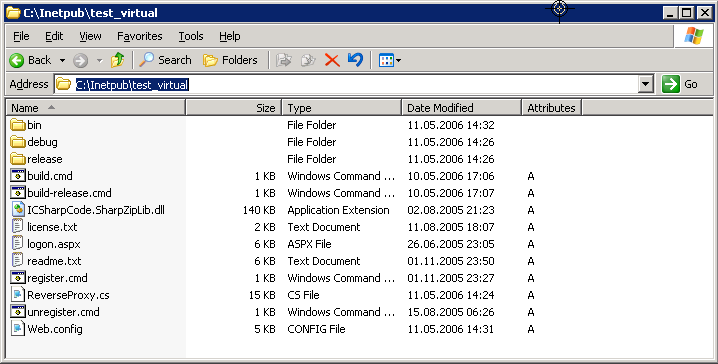
- Create in thBackEndSite virtual directory
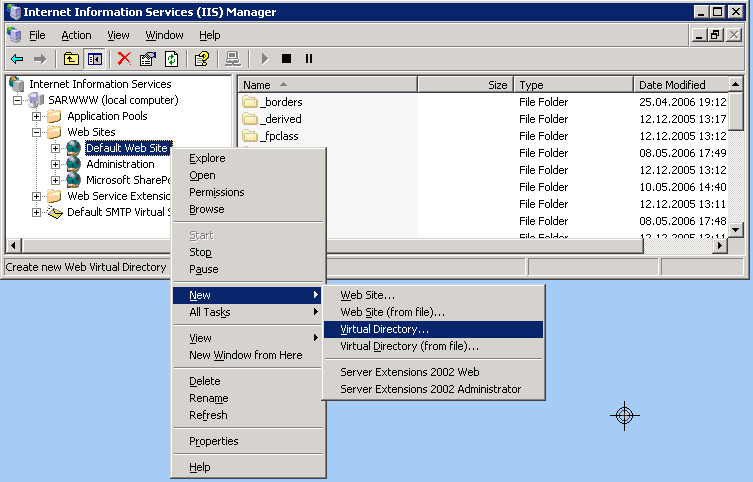
- GappSettingsas name under which the resource should be reachable by the frontend
test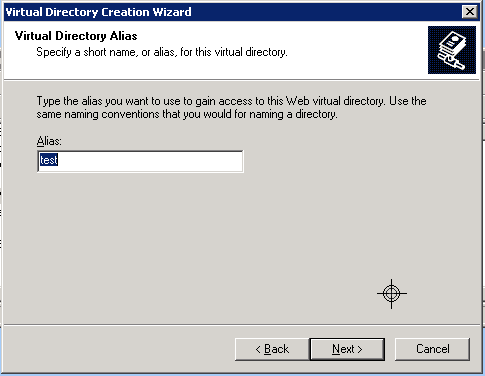
- Select the Web Site Conten Directory
C:\Inetpub\test_virtual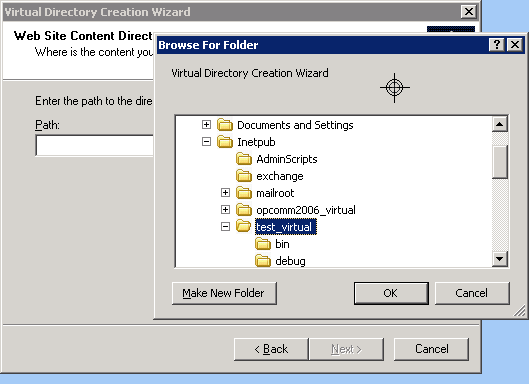
- OK.
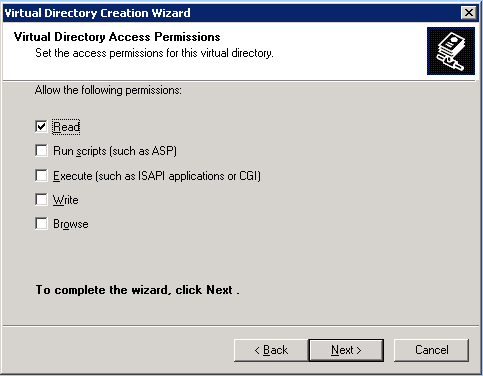
- nowikithepreoperties of the virtual dir.
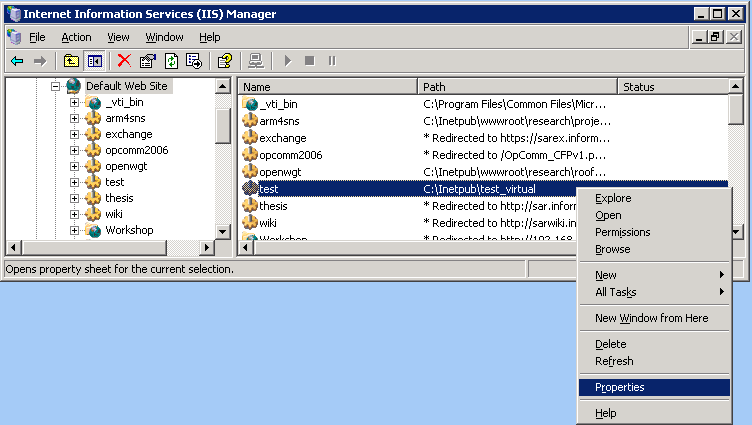
- PUninstalling
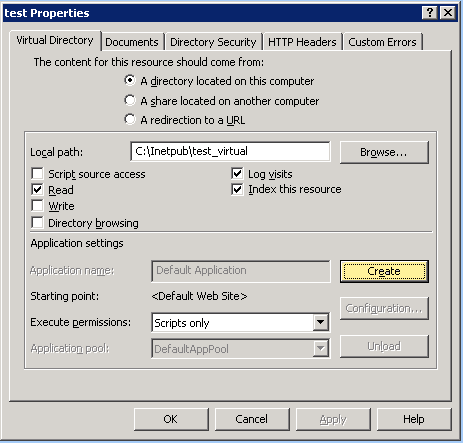
- Press Configuration
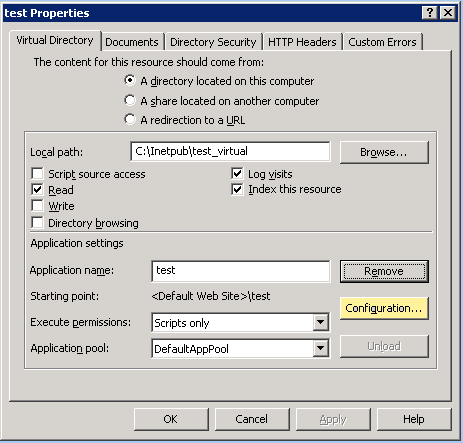
- Insert
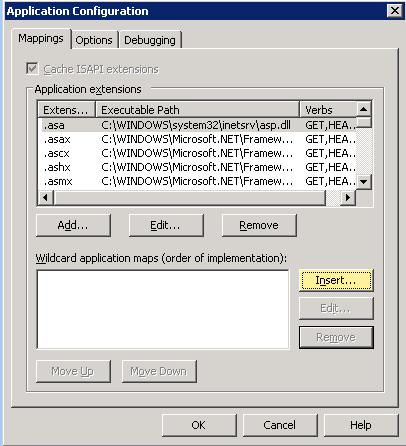
- Enter: Executable
C:\WINDOWS\Microsoft.NET\Framework\v1.1.4322\aspnet_isapi.dlland uncheck "Verify that file exists"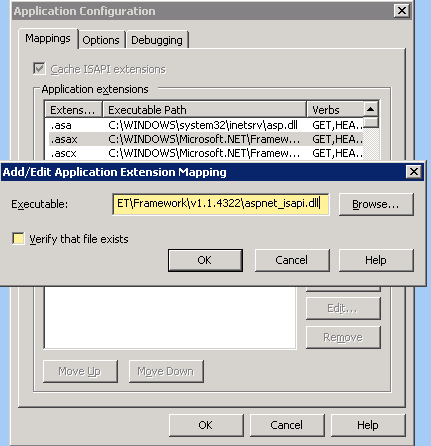
- If you saelect
.asaxand then press Edit it should look like that: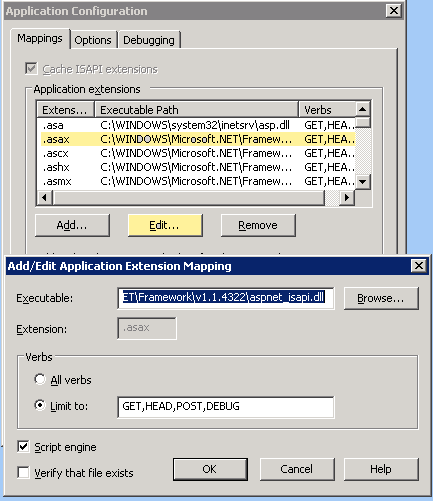
- Open cmd.exe to register
ICSharpCode.SharpZipLib.dlland runcd C:\Inetpub\test_virtual


C:\Inetpub\test_virtual>C:\WINDOWS\Microsoft.NET\Framework\v1.1.4322\gacutil.exe /i ICSharpCode.SharpZipLib.dll 
- Finallly you have to configure the proxy by editing
C:\Inetpub\test_virtual\Web.config<?xml version="1.0" encoding="utf-8" ?>
<configuration>
<appSettings> <add key="BackEndSite" value="http://foo/dir" /> </appSettings>
<system.web>
...
Uninstalling
- Unregister the gzip-DLL
ICSharpCode.SharpZipLib.dllby runninggacutil /u ICSharpCode.SharpZipLib.dll. - Remove the virtual directory
testin the IIS-MMC. - Remove the directory
C:\Inetpub\test_virtual.